About Canon Mini Cam
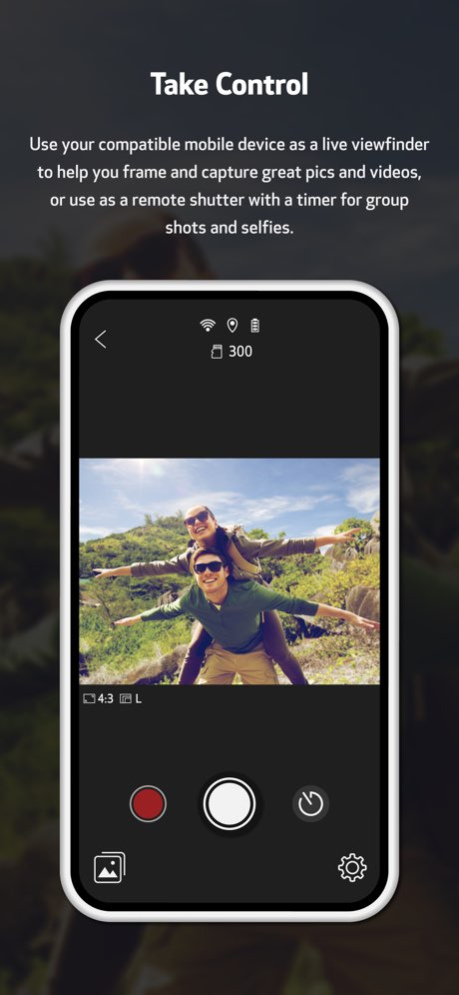
Get the most out of your Canon IVY REC Outdoor Camera with the Canon Mini Cam app. When paired with a compatible mobile device such as a smartphone, you can use the app as a live viewfinder to capture photos and videos,...
Get the most out of your Canon IVY REC Outdoor Camera with the Canon Mini Cam app. When paired with a compatible mobile device such as a smartphone, you can use the app as a live viewfinder to capture photos and videos, and even use it as a remote shutter with a timer. It also keeps you informed about important settings including battery life of the IVY REC camera, remaining image capacity for the MicroSD card, video recording resolution (720p or 1080p), and image size. To view and share photos and videos, the app lets you wirelessly transfer them to your compatible mobile device to print, share and edit. Additional features will be provided in future updates.
Version History Thanks for printing with the Canon Mini Cam App! We've made a few updates, including: - Minor performance improvements and bug fixes 1.2.1 12/21/2023 Service Notice: Mini Cam App Version 1.1.0 includes the following enhancements and fixes: 1. Enhanced image editing features have been added. 2. Enhanced video editing features have been added. 3. Links will open in an external browser window instead of in the app. 4. Dynamic frame icon has been updated. 5. Additional fixes and performance improvements have been added. 1.1.0 09/29/2020 Service Notice: Mini Cam App Version 1.0.5 includes the following enhancements and fixes: 1.Fixes an issue in which some images may not display as thumbnails in the gallery. 2.Includes other fixes and performance improvements. 1.0.5 05/04/2020 Service Notice: Mini Cam App Version 1.0.4 includes several performance enhancements: 1. Improves thumbnail loading speed. 2. Support for selecting multiple files to download or delete has been added. 1.0.4 02/07/2020 The Canon Mini Cam app version 1.0.3 incorporates the following enhancements: • Reduces the time required to connect via WiFi. • Images captured in continuous shooting mode are now sorted by date-time stamp. • Application stability improvements. 1.0.3 12/13/2019 1. Fixes an issue in which selecting cancel on the device does not work when attempting to auto re-connect to the IVY REC Outdoor Camera. 2. Improves ability for devices running iOS 13 to create a WiFi connection with IVY REC Outdoor Camera. 3. Improves the stability of the remote continuous shooting function when connected to devices running iOS. 4. Improves wireless reconnection when the Mode Dial Switch is turned to Photo/Video/Multi mode from wireless mode. 1.0.2 11/15/2019 Thanks for printing with the Canon Mini Cam App! We've made a few updates, including: - Minor performance improvements and bug fixes 1.0.1 10/31/2019 1.0.0 10/12/2019
Previous Versions
Here you can find the changelog of Canon Mini Cam since it was posted on our website on 2021-12-17 02:37:47.
The latest version is 1.2.1 and it was updated on 2026-10-14 05:39:50. See below the changes in each version.
Canon Mini Cam version 1.2.1
Updated At: 2026-10-14
Changes: Version History Thanks for printing with the Canon Mini Cam App! We've made a few updates, including:
- Minor performance improvements and bug fixes 1.2.1 12/21/2023 Service Notice: Mini Cam App Version 1.1.0 includes the following enhancements and fixes:
1. Enhanced image editing features have been added.
2. Enhanced video editing features have been added.
3. Links will open in an external browser window instead of in the app.
4. Dynamic frame icon has been updated.
5. Additional fixes and performance improvements have been added. 1.1.0 09/29/2020 Service Notice: Mini Cam App Version 1.0.5 includes the following enhancements and fixes:
1.Fixes an issue in which some images may not display as thumbnails in the gallery.
2.Includes other fixes and performance improvements. 1.0.5 05/04/2020 Service Notice: Mini Cam App Version 1.0.4 includes several performance enhancements:
1. Improves thumbnail loading speed.
2. Support for selecting multiple files to download or delete has been added. 1.0.4 02/07/2020 The Canon Mini Cam app version 1.0.3 incorporates the following enhancements:
• Reduces the time required to connect via WiFi.
• Images captured in continuous shooting mode are now sorted by date-time stamp.
• Application stability improvements. 1.0.3 12/13/2019 1. Fixes an issue in which selecting cancel on the device does not work when attempting to auto re-connect to the IVY REC Outdoor Camera.
2. Improves ability for devices running iOS 13 to create a WiFi connection with IVY REC Outdoor Camera.
3. Improves the stability of the remote continuous shooting function when connected to devices running iOS.
4. Improves wireless reconnection when the Mode Dial Switch is turned to Photo/Video/Multi mode from wireless mode. 1.0.2 11/15/2019 Thanks for printing with the Canon Mini Cam App! We've made a few updates, including:
- Minor performance improvements and bug fixes 1.0.1 10/31/2019 1.0.0 10/12/2019
Canon Mini Cam version 1.2.1
Updated At: 2023-12-21
Changes: Dec 21, 2023
Version 1.2.1
Thanks for printing with the Canon Mini Cam App! We've made a few updates, including:
- Minor performance improvements and bug fixes
Canon Mini Cam version 1.1.0
Updated At: 2020-09-29
Changes: Sep 29, 2020 Version 1.1.0
Service Notice: Mini Cam App Version 1.1.0 includes the following enhancements and fixes:
1. Enhanced image editing features have been added.
2. Enhanced video editing features have been added.
3. Links will open in an external browser window instead of in the app.
4. Dynamic frame icon has been updated.
5. Additional fixes and performance improvements have been added.
Disclaimer
Official App Store Link
We do not host Canon Mini Cam on our servers. We did not scan it for viruses, adware, spyware or other type of malware. This app is hosted by Apple and passed their terms and conditions to be listed there. We recommend caution when installing it.
The App Store link for Canon Mini Cam is provided to you by apps112.com without any warranties, representations or guarantees of any kind, so access it at your own risk.
If you have questions regarding this particular app contact the publisher directly. For questions about the functionalities of apps112.com contact us.